


Most teams that try AI software testing start in the wrong place. They point a model at the app, ask it to "find bugs," and get a list of guesses. Some are real, many are noise, and nobody can say what the agent actually checked.
At DevIT we build and run our own Shopify apps, so we test our own products every release. This October our QA team ran an AI agent against an internal analytics console we are building for our app portfolio. It was the first full test pass after development wrapped up and before release, the stage where a product is expected to have open defects. The agent did not test against a plan written for QA. It tested against the specification written while the product was being built: the product owner decided what each feature must do, and developers captured those decisions as they built it. Between October 8 and October 14, 2026, the agent produced 75 bug reports in Jira, and almost every one of them points to a numbered requirement. Here is how the chain works, what the agent is good at, and where a human still has to make the call.
Why AI software testing fails without requirements
An agent with no reference point tests what it sees. It clicks a button, sees a success message, and reports that the feature works. It has no way to know that the number on the screen should have been an average, not a sum, because nobody told it what the number means.
A human tester fills that gap with experience and with conversations with the product owner. An agent can't. It needs the expected behavior written down, one statement at a time, in a form it can check. Without that, the agent invents its own expectations, and you end up reviewing its imagination instead of your product.
What the industry data says
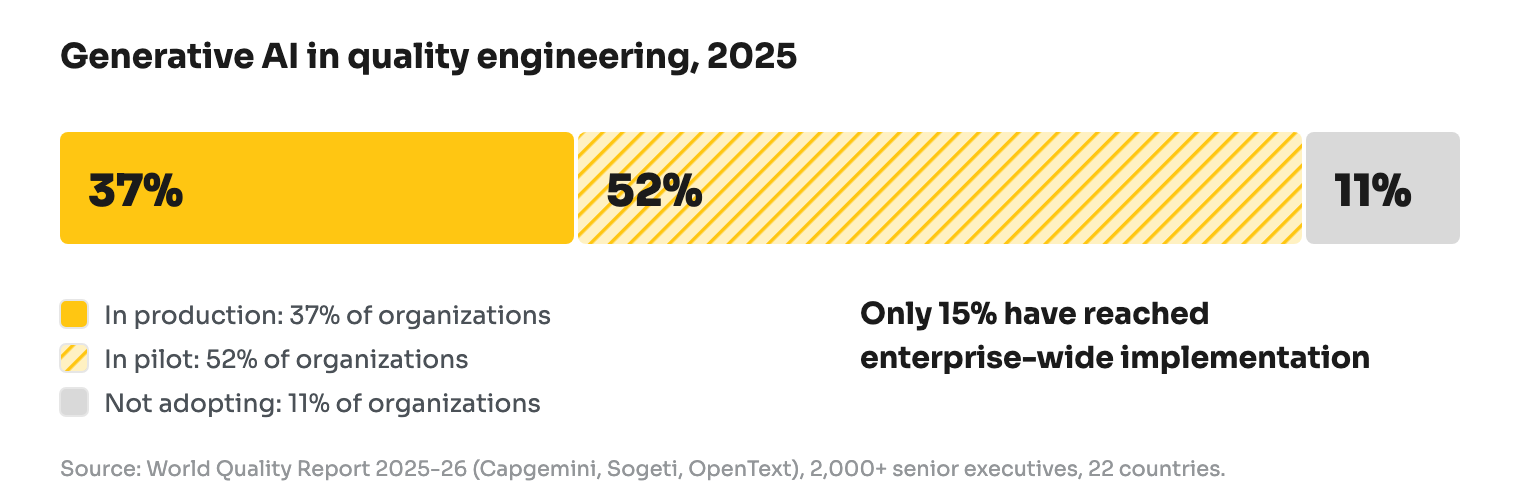
We are not the only ones moving this way. The World Quality Report 2025-26 by Capgemini, Sogeti and OpenText surveyed more than 2,000 senior executives in 22 countries. It found that 89% of organizations are piloting or deploying generative AI in quality engineering, but only 15% have reached enterprise-wide implementation. One third of respondents saw minimal productivity gains.
Two findings from the same report match what we saw. First, test case design and requirements refinement now lead AI adoption in QA, ahead of defect analysis and reporting. That is exactly where our chain starts: requirements first, tests second. Second, 60% of organizations name hallucination and reliability among their top challenges. In our run, that risk showed up as findings the tester had to reject.
Google's 2025 DORA report, based on nearly 5,000 technology professionals, adds the other half of the picture. 90% of respondents use AI at work, and 30% report little or no trust in the code it generates. DORA's conclusion is that without strong automated testing and fast feedback loops, more change volume leads to instability. AI makes teams write code faster, so testing has to keep up.
Three steps, each with a human in the loop
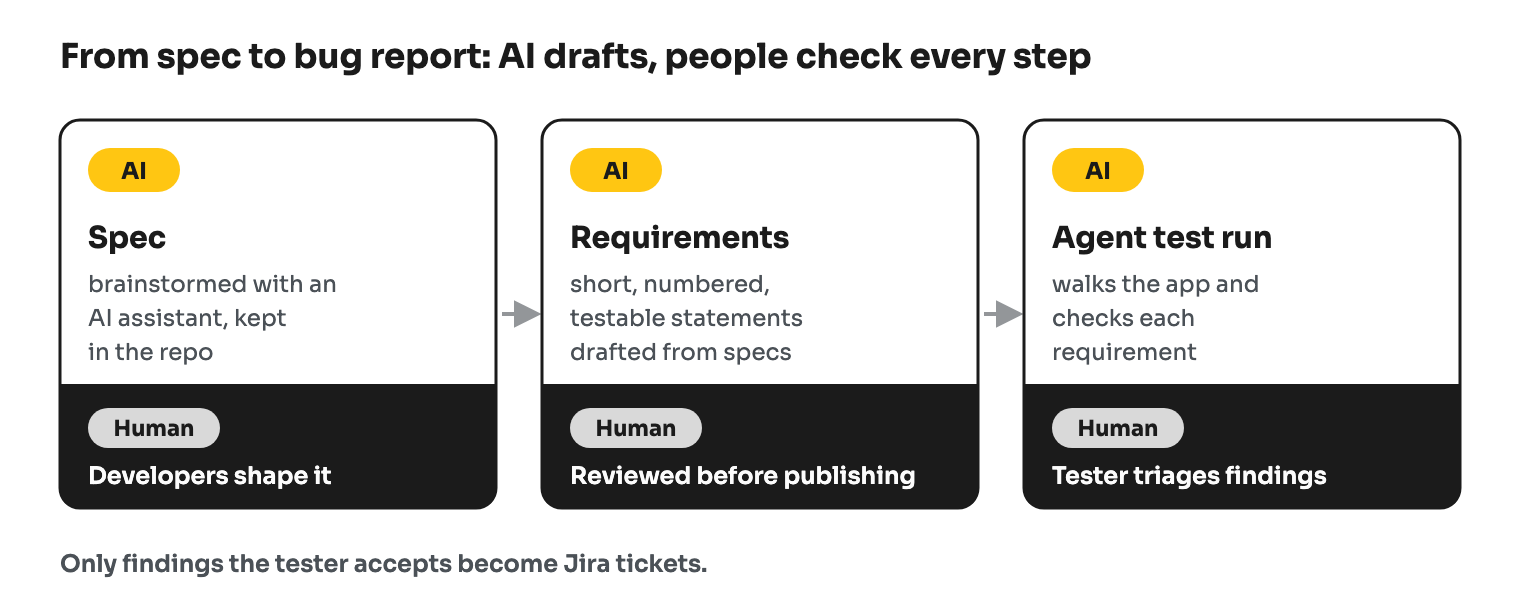
The setup that worked for us has three steps. AI does most of the writing in each one, and a person owns the result.
1. The spec is written while we build. The product owner decides what each feature must do. Developers work those decisions through with an AI assistant as they build: edge cases, limits, trade-offs. The result is a specification that lives in the product repository next to the code.
2. Requirements are generated from the spec. From those specs, AI drafts product requirements: short, testable statements, each with its own ID, grouped by screen. "The list shows each customer once across pages." "Average monthly revenue is the mean of member values." A person reviews them before they are published, and they are what testers write test cases from.
3. An agent tests the product against the requirements. This is the part our QA team built, and it is not a single prompt. The agent is a combination of skills and instructions it follows on every run. It reads a requirements page, walks the matching part of the app, and checks each statement. When something doesn't match, it drafts a bug report with steps, expected result, actual result and the requirement ID.
The requirement ID is what makes the output usable. A developer reading the ticket doesn't argue about whether it is a bug. They open the requirement and see what was agreed.
How the agent actually works
We tried two setups.
The first one needs the least setup: Claude Opus 5.5 with the Claude in Chrome extension. The agent loads our skills and instructions, reads the requirements, clicks through the app in a real browser and drafts tickets. It needs almost no setup. The cost is tokens: the agent "sees" each page as a screenshot, and in our runs each one took roughly 1,000–1,500 tokens.
The second setup uses MCP servers: one to read the requirements pages, Playwright MCP to drive the app, and a Jira MCP to file the results. Reading documents and filing tickets through an API is far cheaper than screenshots. Playwright MCP also works from a text snapshot of the page's accessibility tree, not from images, so each step costs less. The trade-off is setup time: you install Playwright, connect the servers and configure access before the first run.
In both setups the agent does not file anything on its own. It returns a list of findings, and the tester decides which ones become tickets.
What it found
Keep the stage in mind: this was the first full QA pass over the product, right after development and before release. Very few of the 75 reports are crashes. Most are quiet defects that a manual pass skips: a number calculated differently from what its label promises, the same values counted in two totals, one metric under several names, empty states with no message, destructive actions with no confirmation. Nothing on the screen looks broken. You only see these when you check each screen against what was agreed, and that is exactly what the agent does.
What changed in the numbers
These figures are our QA team's estimates from this round, not a benchmark.
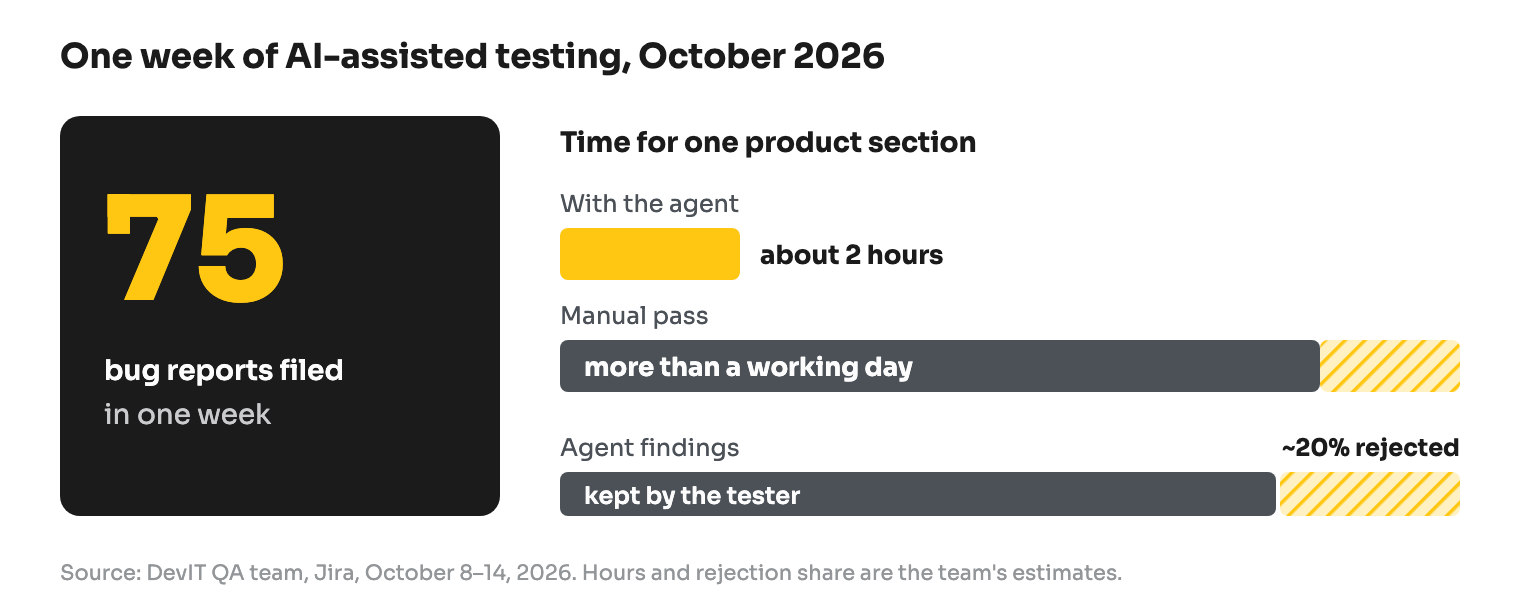
- About 2 hours for a product section, and most of that time went into reviewing the findings. A manual pass over the same section would take more than a day.
- About 20% of the agent's findings were rejected before they reached Jira.
- 75 reports were filed between October 8 and 14, 2026 (Jira, as of October 21), all of them before release.
The bottleneck moved. Finding bugs got faster, and the hard part became triage and fixing.
What didn't work
Before testing the app, we ran an agent over the requirements themselves. It found real gaps. One requirement mentioned a "stated maximum length" for segment names without stating it. Another said the list "stays usable" with many segments, which is a wish, not a requirement. A third allowed two different behaviors when a role is deleted, so a tester couldn't know which one to expect. It also flagged a design risk: if a segment's owner leaves the workspace, nobody can edit or delete their segments, but the nightly job keeps processing them.
We didn't treat that review as its own stage, and we paid for it later. When you tell an agent to test the app against requirements, it tests the app. Where a requirement is vague, it quietly fills in its own answer. Reviewing requirements is a separate step in the testing life cycle for a reason, and with AI in the loop it matters more, not less. Requirements review is now a separate stage in our process, before any test run starts.
Where a human is still required
Our QA team is direct about the limits. The agent is weak at:
- deciding whether something is a bug or a feature;
- judging UI and UX quality, subtle visual defects and animations;
- awkward real-world scenarios and general usability;
- performance as users feel it, real mobile devices, different browsers, slow networks;
- race conditions and flaky results.
It can also report "checked, works" after a shallow check. It sees a success toast without confirming the data was saved, or takes a loading state for the final result. As our testers put it, the agent does exactly what it is told, while an experienced tester senses where bugs are likely to be.
So the agent doesn't replace the tester. It takes over the slow, systematic part, checking each requirement one by one, and leaves the tester the judgment.
What this means if you build software with us
For our clients, AI software testing changes what "QA" includes: the spec written while building becomes the test plan. We can check every written requirement on every release, not a sample. Reports come with a requirement ID, so arguments about expected behavior end quickly. And requirement gaps surface before code is written, when they are cheapest to fix.
It only works when requirements exist and are specific. That is why we treat specs and requirements as part of the deliverable, not paperwork. We wrote about a similar split between AI and people in AI customer support for our Shopify apps, and about how we use AI across DevIT.
If you want a team that tests this way, tell us about your project. To scope the work first, try our project cost calculator. For Shopify specifically, see how we work on Shopify development.