


Every Shopify store runs on small, repetitive jobs. Someone checks whether an order looks fraudulent, tags it for the warehouse, chases it when it sits unfulfilled, copies it into the accounting system, and emails the customer when something goes wrong. Each job takes a few minutes. At a few hundred orders a week, together they become a part-time position nobody hired for, and the person doing them is usually the one who should be growing the business. Shopify business process automation is how we hand those jobs to software that doesn't get tired or forget a step.
At DevIT we have been building software since 2013 and have worked with 700+ clients worldwide. We also run our own workflow automation app, React Flow, which executed over a billion workflow runs for merchants between March 2024 and August 2026. A workflow run is one execution of a workflow: an order checked, a product processed in a bulk update, a row written to a report. Not every run ends in an action. This article covers how we approach automation for a Shopify business, where we start, and what we deliberately leave to people.
Where the hours actually go
When we audit a store's operations, the time rarely disappears into one big task. It leaks through a dozen small ones:
- Order handling: fraud checks, tagging, routing to the right warehouse or supplier, chasing late fulfillment.
- Customer communication: cancellation notices, back-in-stock emails, review requests sent at the wrong moment or not at all.
- Data moving between systems: orders copied into Xero, stock levels pasted into a spreadsheet, a Slack message to the team when a VIP order lands.
- Catalog upkeep: publishing and unpublishing products, updating metafields, adjusting prices across a collection.
None of these needs a person's judgment every time. All of them need a person's judgment once, when the rule is written.
How much time automation gives back
React Flow's own usage gives a grounded answer, but first a word on how we count the time.
How we count the time. A workflow run that does its job can save anywhere from about a minute to an hour of manual work, depending on how many steps and actions it replaces. Tagging a single order by hand takes under a minute. Checking an order, creating an invoice in Xero, emailing the customer and updating the team can take close to an hour. For our estimate we take a simple flow, the kind a store usually sets up first, where one run replaces about five minutes of real manual work. It is the same figure the React Flow dashboard shows merchants.
We applied that to every store that ran workflows in the 30 days to September 24, 2026. To stay conservative, we left out the per-item runs of bulk Fetch steps.
Here is how stores compared:
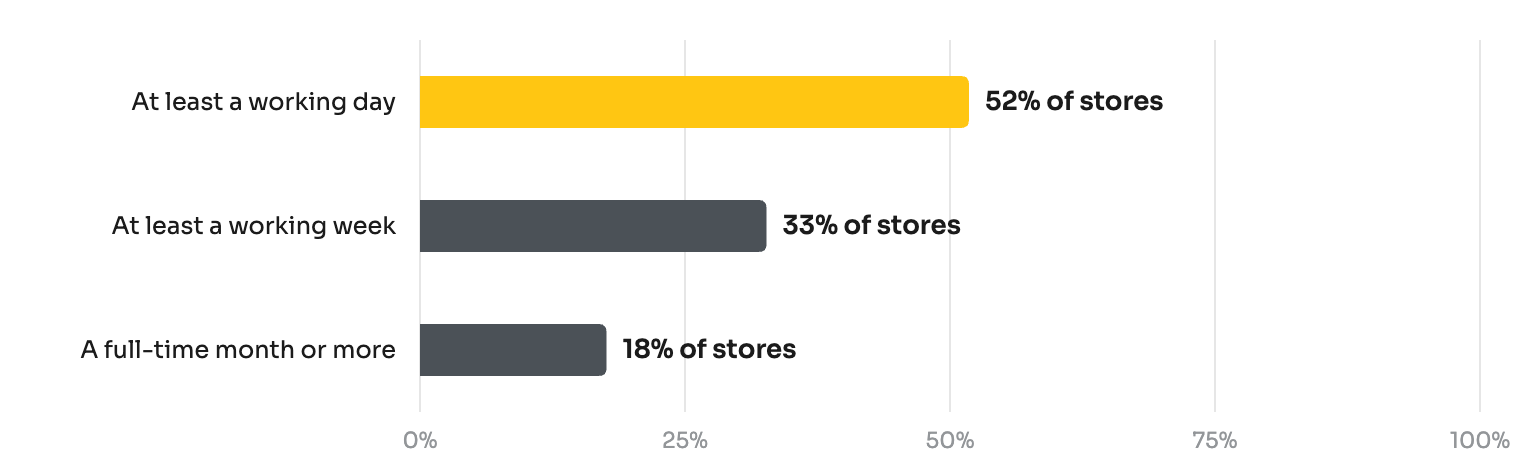
Share of stores by manual work React Flow replaced in 30 days, at five minutes per workflow run, per-item runs of bulk Fetch steps excluded. A working day is 8 hours, a working week 40, a full-time month 168. The hours are an estimate, not a measurement. Source: React Flow usage data, 30 days to September 24, 2026.
More than half of the stores saved at least a working day a month. One in three saved a working week or more, and about one in six saved more than the monthly hours of a full-time employee. A single alert saves minutes; a whole order process can save weeks. That is why we start client work with processes, not single workflows.
Hours are only part of the gain. A workflow doesn't drink coffee, doesn't call in sick, and doesn't ask for a day off in the middle of Black Friday week. It handles an order at 3 a.m. on a Sunday exactly the way it handles one on Monday morning, and it has never once tagged an order "urgnet".
How we approach Shopify workflow automation
We follow the same five steps on every project, whether the result is a handful of workflows or a custom app.
- Audit. We sit with the people who do the work and list every recurring task, how often it happens, and what it costs when it goes wrong.
- Map. Each task becomes a rule: what starts it, what conditions apply, and what should happen. This is where most of the value is found, because a process that nobody has written down usually has three versions in three people's heads.
- Build. We choose the lightest tool that does the job. Usually that is React Flow or Shopify Flow, and occasionally custom code when the logic belongs inside a product.
- Watch. Every new workflow runs in test mode or on alerts only before it is allowed to act. We read its run history for a week or two before we trust it.
- Hand over. The team gets documentation and the ability to change thresholds themselves, without calling us for every tweak.
Order management: where we usually start
Orders are the densest source of repetitive work, so Shopify order management automation is almost always the first win. These are the workflows we build most often:
- Hold high-risk orders. When an order is paid, wait a few minutes, check its risk level, and alert the team. Automatic cancellation with restocking comes later, only once the rule has proven itself.
- Catch stuck fulfillment. A paid order that is still unfulfilled after two days gets a tag and a message to the team, so it appears in a saved view instead of relying on someone's memory.
- Route with tags. Order value, currency, destination, or a specific product decides the tag, and the warehouse, finance, and support teams each filter on their own.
- Recover cancellations. If an order is canceled because an item is out of stock, the customer gets a link to a similar product and a second email when the item is back.
- Ask for reviews at the right time. The request goes out a couple of days after fulfillment succeeds, not while the parcel is still in transit.
What we never automate
Some decisions should stay with a person: refunds above a threshold, anything involving a chargeback, and canceling orders on a rule that hasn't been watched in production. We automate the alert and leave the decision to a human. A workflow that quietly cancels the wrong orders costs more than all the time it ever saved, and a client loses trust in automation after the first one.
What a billion workflow runs taught us
React Flow's telemetry gave us a long view of how Shopify stores actually automate. Three patterns from our telemetry, March 2025 to August 2026, shape how we plan client work:
- Volume grew faster than the store base. Monthly runs grew 86% year over year, from 40.5 million in July 2025 to 75.3 million in July 2026, while the number of active stores did not grow. The growth came from more work per store, not more stores.
- The holiday season is the real test. In November and December 2025, runs were 38–44% above October, around Black Friday and the holiday season. A workflow that behaves in July has to survive that load.
- Bulk jobs carry the volume. In a sample week in August 2026, most runs came from workflows that looped through a whole catalog or order history. Whatever we build for one client, we test at the size of the biggest one.
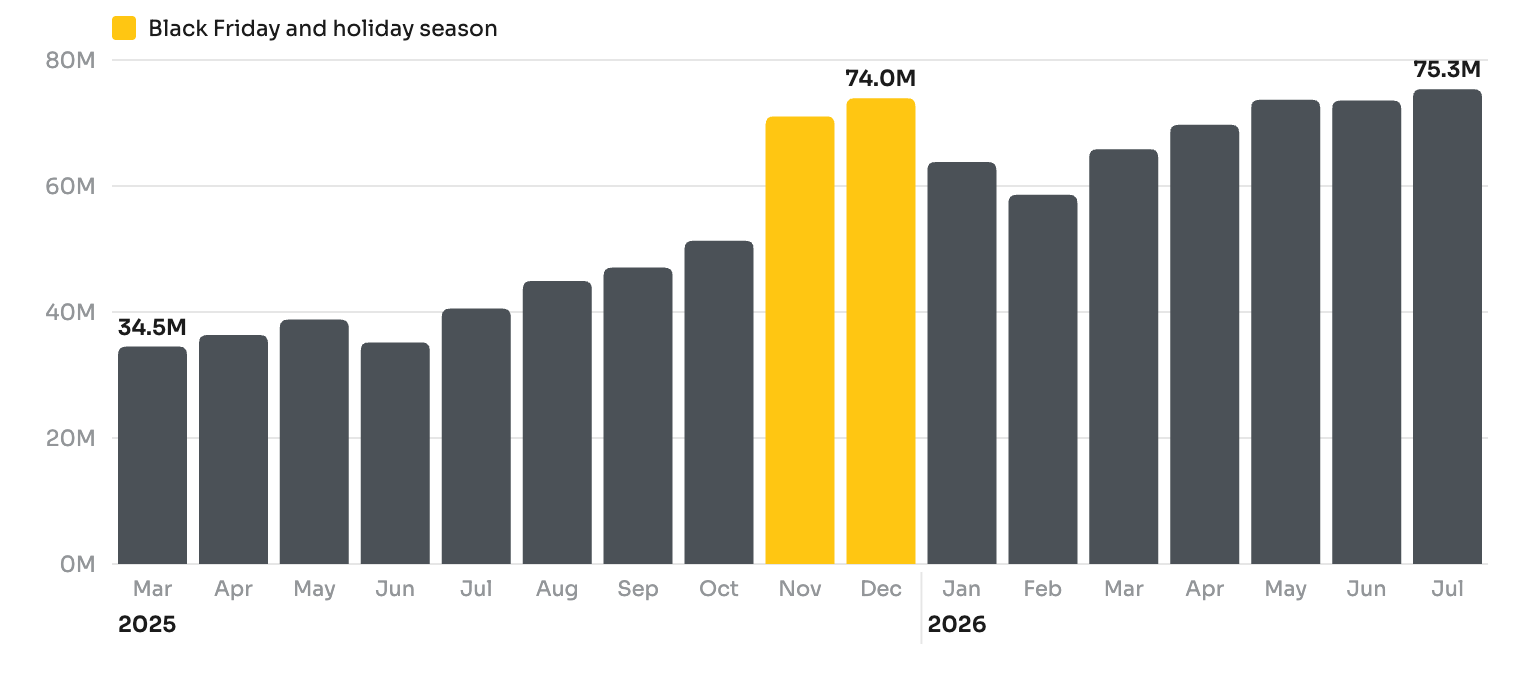
React Flow workflow runs per month, in millions. Source: React Flow product telemetry, March 2025 to July 2026; earlier months used a different tracking scheme and are not comparable.
What went wrong, and what we changed
Running an automation product at this volume taught us things a one-off project never would. At its peak in spring 2026, React Flow was processing more than two million workflow runs a day, and at that load every rare edge case shows up daily. We treated errors as an engineering problem rather than a support one and drove them down over the following months. The lesson carried into client work: automation needs monitoring from day one, not after the first incident.
We also learned that most merchants never get past an empty workflow editor. Installing an automation tool doesn't automate anything. That is why our engineers regularly build a merchant's first workflow for them, and why it is one of the things React Flow's reviews mention most. One merchant summed it up: "they even built the flow I needed for me."
Why merchants trust us with their operations
- We build for e-commerce for a living. Software since 2013, and 700+ clients worldwide.
- We run our own apps on the same platform. React Flow, ReSell, Selecty, Lably, and ShopCart are live on the Shopify App Store, and every listing shows 5.0 stars (October 2026). When Shopify changes an API or a checkout surface, it breaks our own products first, so we have to be ready before our clients notice.
- We turn what we learn into products. React Flow's new Playbooks are ready-made automations built around a proven goal. They cover a second-order offer after the first purchase, a win-back campaign for customers who stopped buying, abandoned checkout recovery, VIP recognition, high-risk order review, and post-purchase cross-sell. Each one turns on with a single click and reports its own results.
- We stay after launch. The engineers who build your workflows are the same people who answer the support chat, and merchants notice: "support team is perhaps the best you will find on any Shopify app."
Doing it yourself: from Shopify Flow to React Flow
If you'd rather build the automation in-house, you don't have to start from scratch.
Shopify Flow is a good app, built by Shopify's own team, and it has taught a lot of merchants to think in triggers, conditions, and actions. We took that idea further. Every day our support team talks to merchants, and almost every conversation shows us another job a store still does by hand. React Flow grew out of those conversations: more building blocks, more connections to the tools a business already uses, and ready-made automations you switch on instead of assembling. It works on every Shopify plan, for a single-founder shop that wants its evenings back and for a Plus operation with a full operations team.
React Flow gives you:
- No 1,000-record cap. The Fetch step works through orders, draft orders, products, collections, and customers without a fixed limit.
- Customer email and more connectors. Built-in email on Standard plans and above, or unlimited through your own SMTP connector, plus Xero, Microsoft, Google Drive, Google Sheets, Slack, Mailchimp, Twilio for SMS and WhatsApp, and PDF and image generation.
- Run a workflow on demand. One-shot triggers start a workflow manually for a one-off fix or a data sync, without waiting for a store event.
- Field-level change triggers. Order Updated, Product Updated, and Inventory Levels Updated can fire on the specific field that changed, and you can test them before going live.
- A/B split. Send a share of runs down each branch, such as 50/50 or 80/20, and compare the results before switching everyone over.
- Shopify Functions support for custom logic at the platform level.
- More than 100 templates and one-click Playbooks to start from.
Explore React Flow or install it from the Shopify App Store.
Let's map your processes
If your team spends its week on work a rule could do, we can start with an audit and a process map, and you'll see where the hours go before any code is written. Tell us about your store, or estimate a project first. You can also browse our Shopify work, read the lifecycle of a Shopify app, including the one we shut down, or see how we measured what AI can do in our own support.