


Every app you install on your Shopify store gets a key to part of your business: products, orders, sometimes customer names and addresses. Whether Shopify apps are safe depends less on Shopify itself and more on how each app developer looks after that key. In 2026, that question got sharper, and Shopify has answered it with the strictest set of app security rules it has ever enforced.
Below we look at why app security moved up the agenda this year, what AI-written code changes, what Shopify now requires from every public app, how to check the apps on your own store in five minutes, and which questions to ask a developer before you trust them with your data.
Why Shopify app security became a 2026 question
2026 is a record year for known software vulnerabilities. From January to October 2026, the US National Vulnerability Database published 92,319 new CVE records, more than twice the 41,213 it published in the same months of 2025 (our count from the NVD API, November 11, 2026). Since July, every month has set a new high.
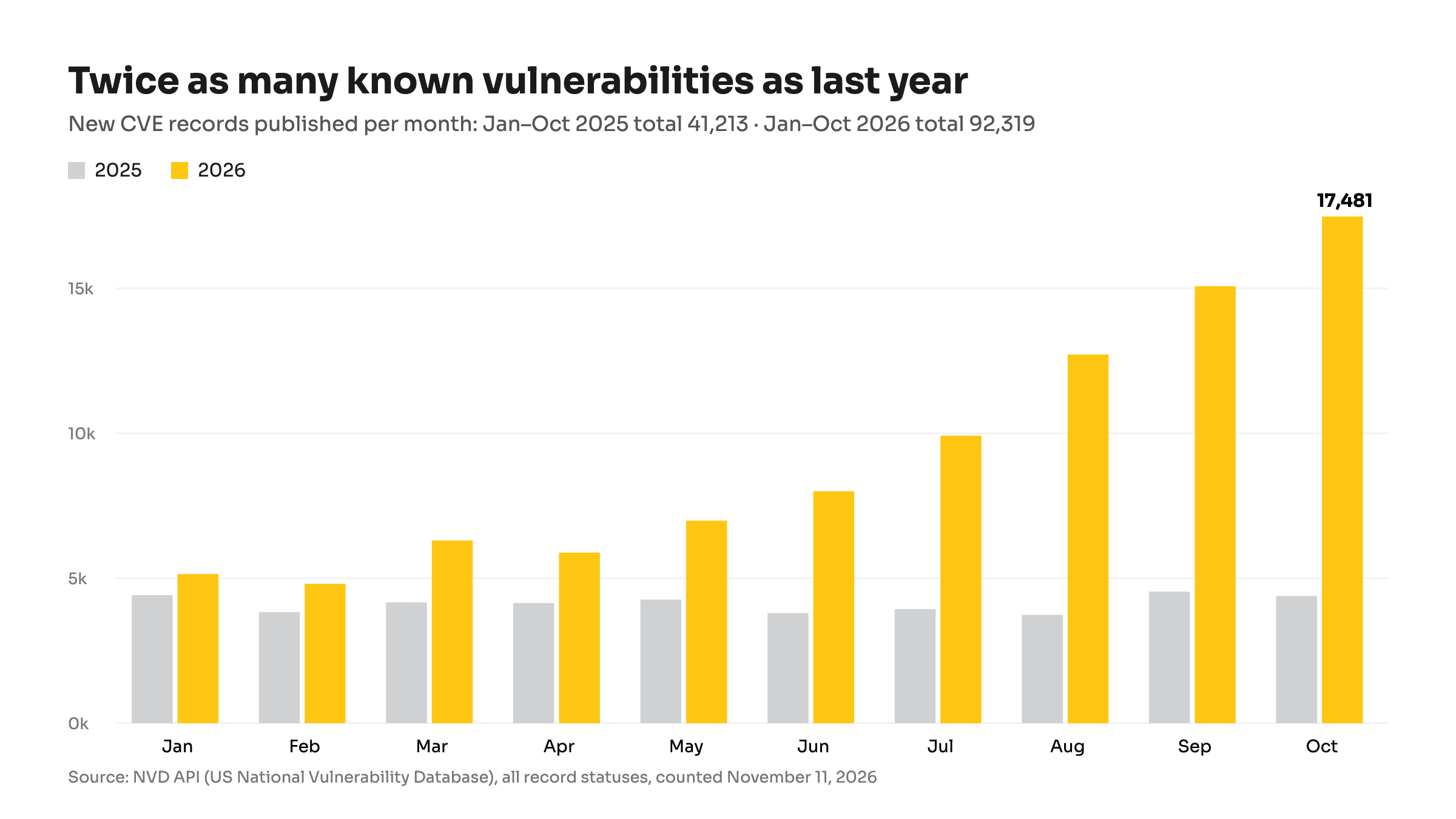
Twice as many known holes as last year, and the curve is still rising. New CVE records published by NVD per month, January–October 2025 and 2026. Source: NVD API, counted November 11, 2026.
Part of the jump is good news. AI-assisted bug hunting now finds flaws at a scale people couldn't reach before, and a few organizations have started issuing records for old issues in bulk. Researchers at FIRST note that the number of vulnerabilities likely to be exploited (those on CISA's known-exploited list or with a high exploit-probability score) has stayed roughly flat (FIRST vulnerability forecast, June 2026). But every record still has to be checked and patched by someone, and attackers read the same lists.
Attackers are using those holes. Verizon's 2026 Data Breach Investigations Report, which covers breaches from November 2024 to October 2025, found that exploiting a vulnerability is now the most common way into a company: 31% of breaches started there. The same report found a third party involved in 48% of breaches, up from 30% a year earlier. Breaches cost more, too: IBM's Cost of a Data Breach Report 2026 puts the global average at $4.99 million, and about $6 million when attackers used AI.
For a store owner, "third party" mostly means apps. An app is a small software company's code running with access to your store, and that code is built on hundreds of open-source packages. In September 2025, a self-replicating worm called Shai-Hulud compromised more than 500 packages in npm, the library ecosystem most web apps rely on (CISA alert, September 23, 2025). Merchants noticed: in one week of October 2026, 21 conversations in our apps' support inbox were security questions, most of them about widely reported PHP vulnerabilities.
AI writes more code than ever. Who checks it?
The same tools that speed up attackers speed up developers. In Sonar's survey of more than 1,100 developers, 42% of the code they commit is already generated by AI, and they expect 65% by 2027. Yet 96% don't fully trust that this code is correct, and only 48% always check it before committing (Sonar, State of Code 2026).
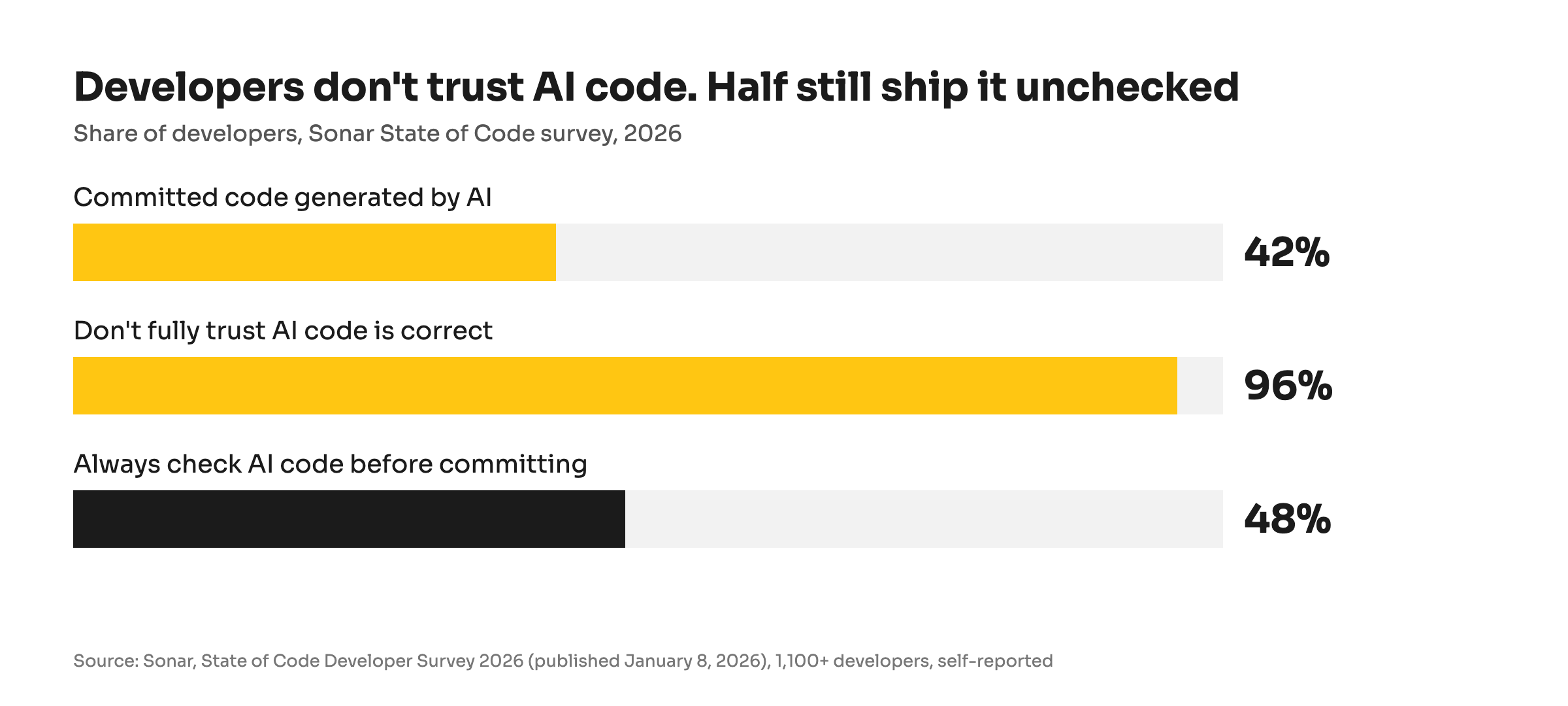
Developers don't trust AI code, and half of them still ship it unchecked. Source: Sonar State of Code Developer Survey 2026, 1,100+ developers, self-reported.
That gap matters because AI code is not secure by default. Veracode has tested leading AI models on the same kind of coding tasks since 2025. A year ago, 45% of the tasks came back with a security flaw. In July 2026 it was 44%, and in October 2026 it dropped to 38%, the first real improvement since the series began (Veracode, October 2026). Better, but still more than one task in three.
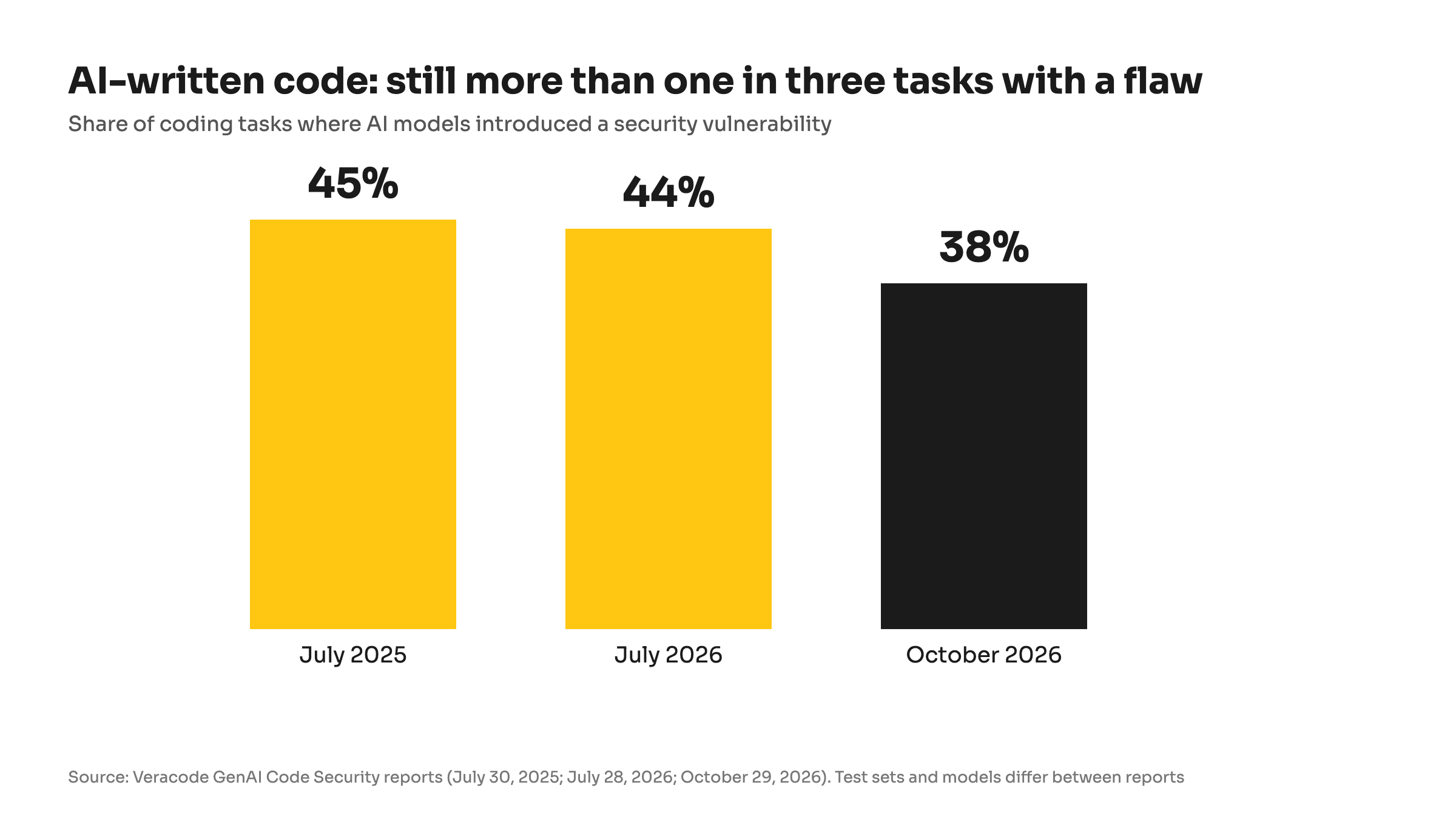
Still more than one in three: share of AI coding tasks that introduced a security flaw in Veracode's tests. Source: Veracode GenAI Code Security reports, July 2025, July 2026, October 2026.
The risk is highest when nobody with security experience looks at the result. When Escape scanned more than 5,600 public apps built with AI app builders in 2025, it found over 2,000 vulnerabilities, more than 400 exposed secrets such as passwords and API keys, and 175 cases of exposed personal data, including medical records and bank details (Escape, October 2025).
None of this is an argument against AI. It is the reason AI-built software needs an experienced team around it. AI gives a project a real boost in speed: in our own projects, work that used to take a week often takes a few days. The same speed lets a team without review habits ship a security hole to production just as fast. For a serious product that handles customer data or payments, that is the difference between hiring a team and building it alone with an AI assistant.
How Shopify is tightening security rules for apps
Shopify's answer has been to make the developer, not the merchant, carry more of the burden. Six changes matter most for a store owner. Most of them came in a single month: on October 20, 2026, Shopify asked every app developer to act that week (Securing your app, together), and a week later it published the details (Security update, October 27, 2026).
1. App access keys that expire. Until now, the key an app used to work with your store in the background never expired. If it leaked, it worked until someone noticed. All public apps must switch to keys that expire and refresh by January 1, 2027. Apps that don't are removed from the Shopify App Store and blocked from new installs, and from April 1, 2027 their old keys stop working (Shopify changelog, October 27, 2026).
2. Only known networks can use the key. Since November 2026, every public app must tell Shopify which networks its servers call from. A stolen key used from anywhere else is refused. Apps without this setup are delisted after November 20, 2026 (Shopify changelog, November 5, 2026).
3. Apps declare which servers they talk to. An app now lists in its configuration every outside server its code loads from or sends data to. Shopify uses that list to spot requests the app didn't make, such as malicious requests on your storefront (Shopify changelog, October 27, 2026). Shopify strongly recommends this step but doesn't require it yet.
4. An official security check for developers. In October 2026, Shopify gave developers a command that scans an app for the vulnerability patterns most common in Shopify apps. Early testers found gaps in login checks and data that could leak between stores. Shopify asks developers to run it before every release (Shopify changelog, October 15, 2026).
5. Verified identity before an app reaches a store in progress. Shopify now verifies the developer's identity before an app is installed on a development store or a store being built for transfer to a client. If an agency is building your store, the apps it installs come from verified developers.
6. No more code pasted into your theme. Apps can no longer add scripts to your storefront the old way since October 1, 2026, and Shopify stops loading existing ones on March 1, 2027 (Shopify changelog). Apps now plug into your theme through blocks you can see and switch off in the theme editor.
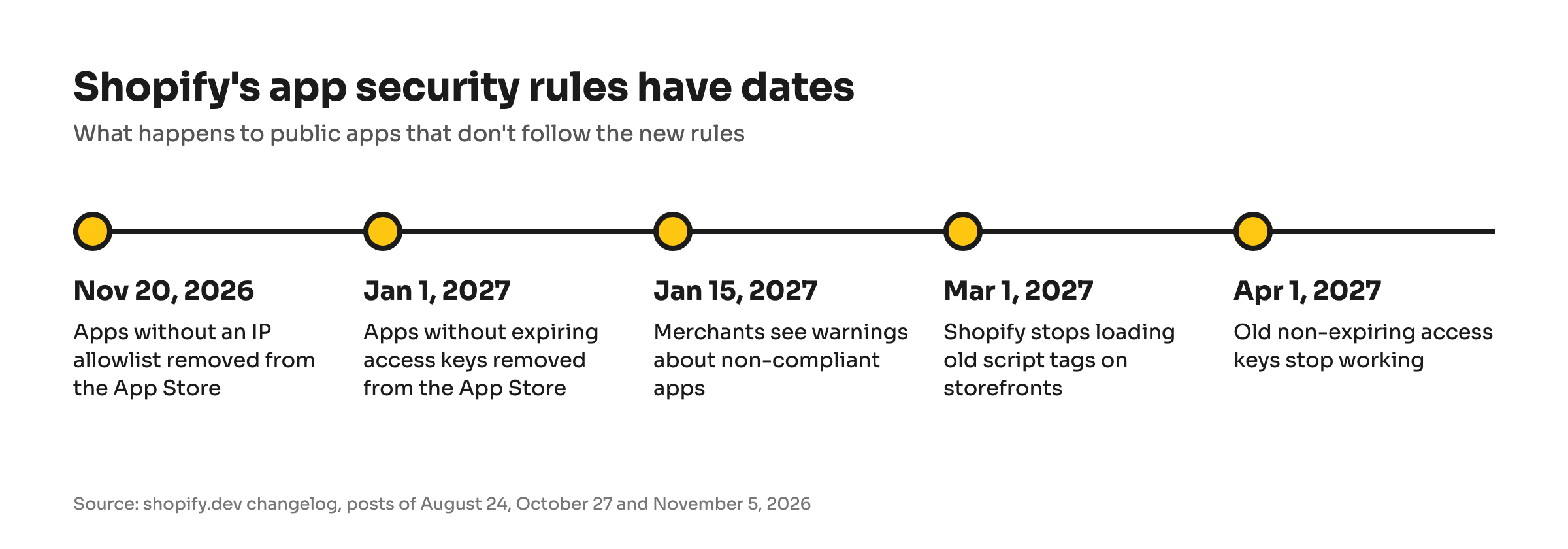
The rules have dates: by April 2027, an app that ignored them stops working. Source: shopify.dev changelog.
What every Shopify app on your store must already do
The new rules sit on top of requirements that every public app has had to meet for years. If an app is listed in the Shopify App Store, it should:
- Ask only for the access it needs. An app that adds labels to product images has no reason to read your orders. Shopify's App Store requirements say so directly, and some sensitive permissions require a written justification.
- Delete customer data on request. When a customer asks you to erase their data, Shopify forwards the request to every app that holds it. When you uninstall an app, Shopify asks it to erase your store's data 48 hours later. Apps must complete these requests within 30 days (Shopify privacy compliance).
- Protect customer details it stores. Apps that use names, addresses, emails or phone numbers go through an extra review. They must encrypt that data, keep test and live data apart and have a plan for incidents (protected customer data).
- Fix a security problem and tell you about it. If a developer suspects a security issue in its app, it must report it to Shopify right away, fix it and notify the merchants affected (Shopify, October 27, 2026).
Shopify reviews these points before an app is listed. What the review can't see is what happens after: how fast the developer reacts to a new rule or a new vulnerability.
How to check the apps on your Shopify store
You don't need a developer to see what your apps can do. In your Shopify admin, open Settings → Apps, choose an app and open Activity and permissions (Shopify Help Center). There you will find:
- What the app can see and change, in plain language.
- When it last used its access. Shopify marks access the app hasn't used in 30 days.
- Privacy details and security checks, such as whether the app already uses expiring keys.
Shopify notes that these checks are not an overall safety rating, so treat them as a starting point. Two habits help more than any single check. Remove apps you no longer use, because an unused app still holds its key. And when an app asks for new permissions after an update, read what it wants before you approve.
Questions to ask a Shopify developer about security
The admin shows what an app can do. It doesn't show how the team behind it works. These five questions do, and they work the same for an app developer and for an agency building a custom app for your store.
- How do you hear about Shopify's security changes? A good answer names a routine: someone reads the Shopify developer changelog on a schedule and turns each change into a task with a date.
- Are you ready for the January 2027 key deadline? A good answer is yes, with a date, or a plan that ends well before January.
- How do you check your code for security issues? Listen for a defined routine that includes Shopify's own security check, not "our developers are careful."
- What happens to my data when I uninstall? A good answer describes what is deleted and when, in line with Shopify's 48-hour and 30-day rules.
- Can you share your security documentation? A good answer is yes: written policies or a vendor security profile, shared during due diligence.
Notice what is missing from the list: "Tell me about your vulnerabilities." A careful developer won't share details of security issues in its own products until they are fixed, and you should be wary of one that does.
How we keep our Shopify apps in line with security rules
We build and run our own apps on the Shopify App Store and build custom apps for merchants, so these questions apply to us first. This is how we answer them.
We follow Shopify's developer changelog every week. Security changes go straight to the team that owns each app. When Shopify made network restrictions mandatory on November 5, 2026, all our public apps were set up well before the November 20 cut-off.
AI speeds us up. Engineers stay responsible for what ships. We use AI across our work, from writing code to testing it with an AI agent (how we use AI at DevIT). It shortens our delivery times, but it doesn't replace review. Every change is merged by an engineer who answers for it, and AI-written code goes through the same process as any other.
We run Shopify's own security check on our apps. When Shopify released its official security check on October 15, 2026, we started running it on our apps within a week, and every finding became a tracked task.
One fix reaches every app. Login, access keys, data deletion and security headers live in a shared library that all our apps use. When a rule changes, we change it once, and each app picks it up with its next release. That is how expiring keys reach our apps: the shared library update is ready and rolling out app by app, ahead of the January 2027 deadline.
We don't publish details of security findings. You won't find a list of what our checks turned up in this article. That is deliberate and common practice in security: a detailed description helps attackers look for the same weakness in other apps built the same way.
Our security practices are on record. We keep a supplier security profile on Risk Ledger, a platform companies use to assess vendors. It is reassessed every six months and covers our information security, incident response and backup policies. Clients can request access to it during vendor due diligence.
Security is never finished
None of this makes an app permanently safe. New vulnerabilities appear every day, attackers adopt new tools, and Shopify will keep raising the bar: four of the six changes above were announced in a single month. We treat security the same way we treat performance, as part of the regular work on every app and every client project, not a one-time audit.
If you are planning a custom app or an integration for your store and want AI's speed without its shortcuts, built to Shopify's current security rules from day one, talk to our team. You can also read how to choose a Shopify agency for the other questions worth asking, or see what we build on Shopify.