

Black Friday 2026 falls on November 27, and Cyber Monday on November 30. For many Shopify merchants, those four days are the busiest of the year, and every weak spot in the store shows up at once: a slow theme, a broken discount, a tracking pixel that stopped firing in August. If you want to prepare your Shopify store for Black Friday, the work starts now, not the week before.
We have built on Shopify since 2016. As of October 2026, our Shopify page counts 25 stores, 64 Shopify projects and 48 apps. Five of those apps are our own and live on the App Store, so we see the platform from both sides, as the team that builds stores and as the studio that ships code into thousands of them. This checklist is what we would review in any store before the peak.
Why this Black Friday is different
Last year's weekend set a record. Shopify reported $14.6 billion in merchant sales over Black Friday–Cyber Monday 2025, up 27% year over year, with a peak of $5.1 million per minute (Shopify press release, December 2, 2025). Shopify notes the figures are estimates and unaudited. The wider market moved the same way: Adobe counted $11.8 billion in US online spending on Black Friday alone, up 9.1%, and $44.2 billion across Cyber Week (Adobe, December 2, 2025). Globally, Salesforce estimated Cyber Week sales at $336.6 billion, up 7% (Salesforce, December 5, 2025).
What makes 2026 different is not the size of the weekend. It is that two parts of the platform changed under existing stores:
- Shopify Scripts no longer run. Shopify retired Scripts on June 30, 2026; since then no Script runs at all (Shopify changelog). If your tiered discounts, free-gift logic or shipping rules lived in a Script, they are gone unless someone rebuilt them on Shopify Functions.
- Thank you and Order status pages were upgraded. The deadline for non-Plus stores was August 26, 2026, and the additional scripts box has been view-only since August 28, 2025 (Shopify Help Center). Customizations on the old pages do not carry over.
Neither change throws an error. Orders keep coming in, and the store looks fine. That is why this is the first thing to check.

Start with checkout and the thank-you page
Place a real test order on desktop and on a phone, then walk through what happened:
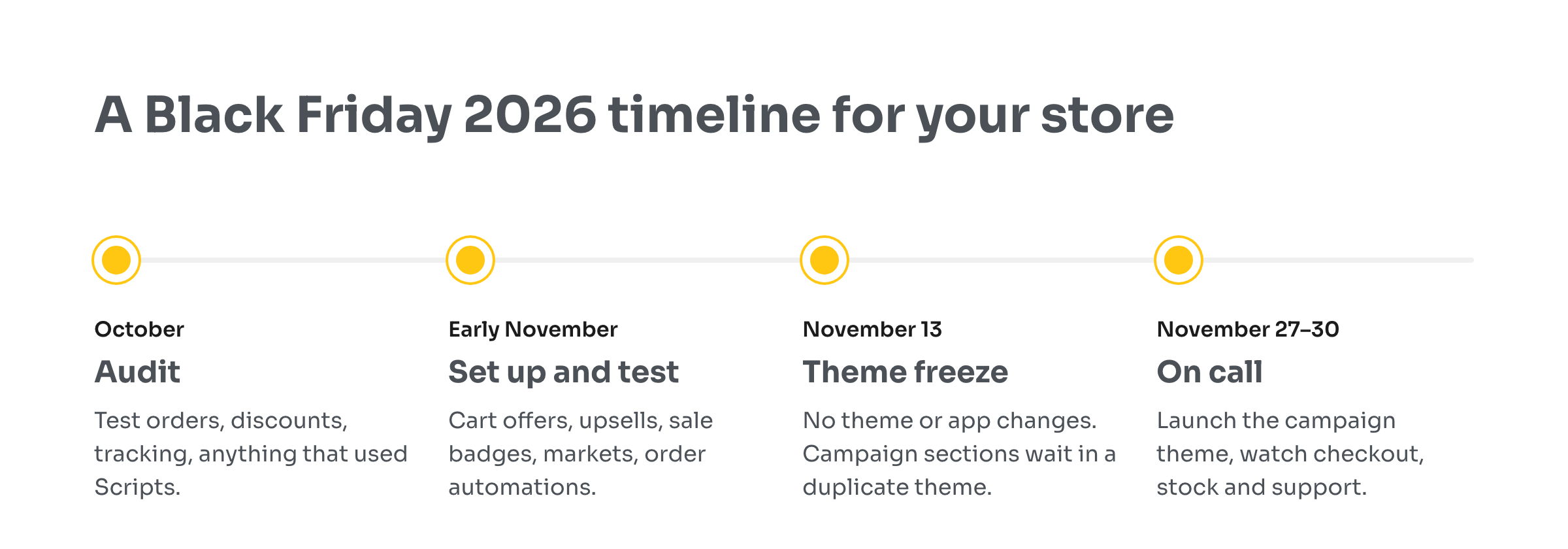
- Discounts. Does every promotion you plan to run apply at checkout, including stacked and tiered ones? Anything that used to depend on a Script needs a Functions-based replacement. Shopify's built-in discounts cover many cases; apps built on Functions cover more.
- Conversion tracking. Open your ads and analytics dashboards and confirm the test purchase arrived. Pixels pasted into the old additional scripts box stopped working with the upgrade, and the first sign is often a campaign that suddenly reports zero sales.
- Thank-you page content. If you showed a survey, a referral offer or a cross-sell there, check it still appears. On the new pages, that content comes from checkout UI extensions and app blocks, not from pasted code.
Checkout is also where most sales are lost. Baymard Institute puts the average documented cart abandonment rate at 70.22% across 50 studies, and estimates that a large e-commerce site can raise its conversion rate by 35.26% through better checkout design alone (Baymard Institute).
If you find a gap, fix it now. The week before Black Friday is the worst time to discover that a discount silently stopped applying.
Speed and the app stack
Peak traffic punishes slow pages, and most of that traffic is on phones: on Cyber Monday 2025, 57.5% of US online sales came from mobile devices (Adobe). Speed shows up in revenue. In a study of 37 brands commissioned by Google, Deloitte found that a 0.1-second improvement in mobile site speed was associated with 8.4% more conversions for retail sites (Milliseconds Make Millions).

Run your home page, a collection page and a product page through PageSpeed Insights on mobile, and look at what loads:
- Audit your apps. Every installed app can add scripts to the storefront. Remove the ones you no longer use, and check that uninstalled apps did not leave code in the theme.
- Compress the heavy media. Hero videos and large lifestyle images are the usual culprits on campaign pages.
- Freeze the theme. Pick a date, usually two weeks before Black Friday, after which no one publishes theme or app changes. Prepare campaign banners and sections in a duplicate theme and switch on the morning of launch.
A freeze sounds bureaucratic until a "small" theme edit breaks the cart on Friday morning.
Raise order value without giving away the margin
A deeper discount is the obvious lever and the most expensive one. Shoppers arrive ready to buy, so the cheaper win is making each order bigger:
- In the cart. A free-shipping progress bar, a relevant add-on and gift wrap or shipping protection work best in the cart drawer, before the shopper reaches checkout. We built ShopCart for exactly this; it is free on the Shopify App Store.
- After payment. A one-click offer after the payment is accepted does not risk the original order. ReSell shows offers at checkout, after purchase and on the thank-you page (App Store listing).
- On the product grid. Shoppers scan collections fast during a sale. Clear "Black Friday", "Low stock" or "−30%" badges help them see the deal without opening every product. Lably can schedule labels for the campaign window and show them by stock status or discount range, so they appear and disappear on time.
Whatever you use, set it up and test it in October. Merchants who install an upsell app on Thanksgiving rarely have time to tune it.
Don't lose international shoppers
Black Friday is no longer a US-only event, and international visitors leave fast when prices show in the wrong currency. Check that Shopify Markets is configured for the countries you actually ship to, that prices and duties are clear, and that visitors from abroad land on the right market or store. Selecty adds country, currency and language selectors and geolocation redirects on top of Markets, including redirects between separate expansion stores.
Plan for the order surge, not just the traffic
The weekend ends; the fulfillment backlog does not. Decide in advance who handles what when orders spike:
- Tag and route orders automatically: priority shipping, gift orders, orders from VIP customers, orders flagged as risky.
- Watch inventory so best sellers do not oversell, and hide products that run out.
- Prepare support: canned replies for "where is my order", a clear returns page and extra hours on the busiest days.
Shopify Flow handles many of these rules. When you need more, such as external integrations, schedules or custom logic, we wrote about the approach in Shopify business process automation, and our app React Flow covers tagging, stock alerts and risky-order handling out of the box (App Store listing).
What this year's platform changes did to our own apps
We are not immune to the same changes. In October, while testing the ReSell 2.5.0 release, our QA engineer found that offers with a "Customer tag" condition did not show at checkout, on the thank-you page or on the order status page. The cause was the move to a newer API version: the field our code read the customer from no longer existed there, and the buyer now comes from a different object. Nothing crashed. The offers simply did not appear.
The fix was a single commit, and it shipped with 2.5.0. What caught the bug was not monitoring but a tester checking the offer conditions by hand. That is the lesson for any store owner: platform updates fail quietly, and the only defense is to test the flows that make you money, on purpose, before the traffic arrives.
Get a second pair of eyes before the peak
A checklist tells you what to look at. It does not tell you what broke in your particular store, and that is where most of the time goes. Custom theme code, discount logic that used to live in Scripts, several markets or expansion stores, integrations with an ERP or a warehouse: these are the places where this year's platform changes fail quietly.
Our team has worked with online stores on Shopify since 2016. Before Black Friday, we can audit your store against this list, rebuild what stopped working, test the flows that bring in revenue and stay on call through the weekend. Tell us about your store, or estimate the work first.